ManPage
Native macOS Man Page Viewer with Highlighting


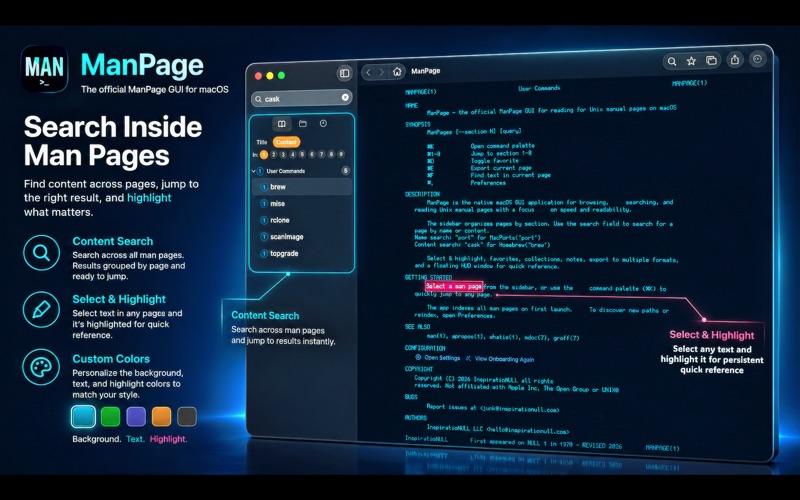


The official UNIX manual page viewer for macOS. Experience UNIX manual pages like never before. ManPage is a native macOS GUI designed to make browsing, reading, and referencing terminal documentation remarkably faster and more efficient. Say goodbye to scrolling slowly in terminal pagers. With our exclusive Persistent Highlighting, you can mark key flags and arguments exactly as you would in a real textbook, your highlights are saved automatically and remain every time you pull up the page. Enhance your workflow with Smart Annotations, a Floating HUD Mode to keep your documentation visible without blocking your terminal, and powerful Full-Text Search across the entirety of your system's manual archive.
Experience UNIX manual pages a new way. ManPage is a Swift GUI designed to make browsing, reading, and referencing terminal documentation faster and more efficient.
Exclusive ManPage features -> (*) ---- Persistent Highlighting (*): Mark key flags and parameters just like you would in a physical textbook. Your highlights are saved automatically and persist every time you open the page. Content Searching & Full-Text Search(*): Search inside all ManPage's and receive results instantly | Don't just search titles, search the actual content of every man page on your system to find exactly what you need. Automatic Path Configuration(*) No manual path entry starting from '/' for every location! Our setup wizard detects your system paths instantly and gives you one click adding! Smart Annotations(*): Attach quick notes or complex command snippets to the top of any man page for instant recall. Floating HUD Mode(Picture-in-Picture)(*): Keep your documentation visible in a compact, "always-on-top" window while you work in your terminal. ---- Native Customization: Change your font, and theme exactly how you want!
Every app, one click away
 Symlinks
 Resurface
 translated
 AppVoid
 XScribe
 LookQuick
 Duplicute
 Unzipped
 FileFlip
 SickArmyKnife
 Prompt Injector
 DoneAssets
 SneakyLinksFinder
 BimmerWire
 Skydle
 Aurally
 FocalSpeaker
 SeriousRemote
 Solitairy
 LabsFX
 DragDealer
 Find&Replace
 Sandboxed
 Denude
 FloStates
 ImageSVG
 FrameBuffer
 Toki
Toki
 Comment
 JXL
JXL
 FilesDrive
 WindowTint
 terminalOS
 ShepardTone
Free. The extras are optional.
ManPage is free to use, no trial, no ads, no subscription. Some extras are available as an in-app purchase. If it saved you an afternoon, the tip jar is right there. If it annoyed you, the inbox is too.