ManPage
構文ハイライト対応 ネイティブ macOS Man Page ビューア


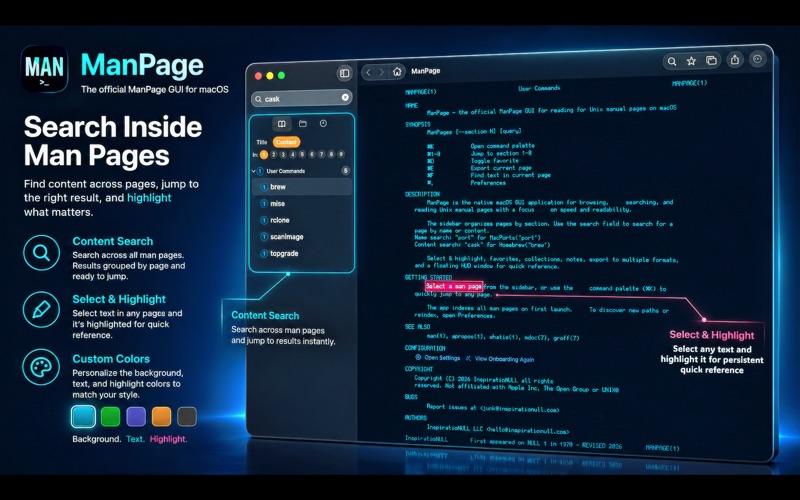


macOSのための公式UNIXマニュアルページビューア。UNIXのmanページがかつてないほど快適に。ManPageは、ターミナルドキュメントのブラウズ、閲覧、リファレンス確認を圧倒的に高速かつ効率的にするために設計されたmacOSネイティブGUIです。ターミナルページャーでのもどかしいスクロールとはもうお別れ。独自のPersistent Highlighting機能を使えば、まるで紙の技術書のように主要なフラグや引数をハイライト可能。ハイライトは自動保存され、ページを開き直してもそのまま残ります。Smart Annotationsや、ターミナルを遮らずにドキュメントを常時表示できるフローティングHUDモード、システム全体のマニュアルアーカイブを網羅する強力なフルテキスト検索で、ワークフローを劇的に進化させましょう。
UNIXマニュアルページを新しいスタイルで。ManPageは、ターミナルドキュメントの閲覧・検索・リファレンスを劇的に高速化するSwift製GUIです。
Exclusive ManPage features -> (*) ---- Persistent Highlighting (*): Mark key flags and parameters just like you would in a physical textbook. Your highlights are saved automatically and persist every time you open the page. Content Searching & Full-Text Search(*): Search inside all ManPage's and receive results instantly | Don't just search titles, search the actual content of every man page on your system to find exactly what you need. Automatic Path Configuration(*) No manual path entry starting from '/' for every location! Our setup wizard detects your system paths instantly and gives you one click adding! Smart Annotations(*): Attach quick notes or complex command snippets to the top of any man page for instant recall. Floating HUD Mode(Picture-in-Picture)(*): Keep your documentation visible in a compact, "always-on-top" window while you work in your terminal. ---- Native Customization: Change your font, and theme exactly how you want!
あらゆるアプリへ、ワンクリックでアクセス















基本無料。追加機能はお好みで。
ManPage は完全無料です。試用期間も広告もサブスクもありません。一部のおまけ機能はアプリ内課金でご利用いただけます。作業時間を半日浮かせられたなら投げ銭をぜひ。イラッとさせられたなら、お問い合わせフォームへどうぞ。